
Life counter & chess clock
The life counter that knows who has priority
Respond on someone else's turn and their clock pauses while yours runs: time spent responding is charged to the responder, not the active player. Plus stats for every player and deck, one-tap presets for your pod, and 17 game types across 10 card games, not just Magic.
Free, no ads, works offline. Runs in your browser on any phone, tablet or computer, with no sign-up.
The clock
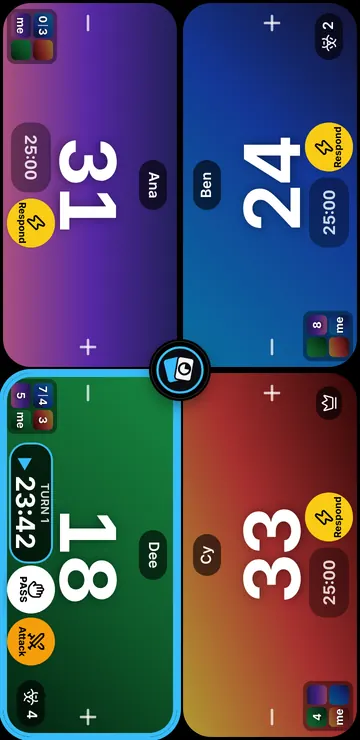
A chess clock that knows who has priority
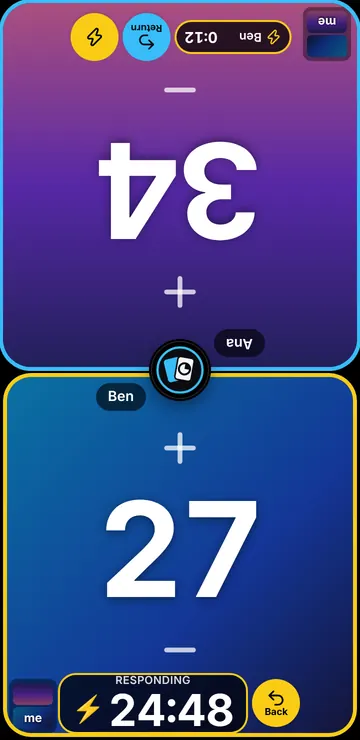
Tap Respond on someone else's turn: their clock pauses and yours runs until you pass back. Time spent responding is charged to the responder, never to the player whose turn it is.
- Clocks for 2 to 8 players, one per seat, passed around the table with the turn.
- Bank, bank with increment, bank with delay, time per turn, and per turn with a reserve bank.
- Free time at the start of each turn before your bank starts to drain, and optionally when you respond.
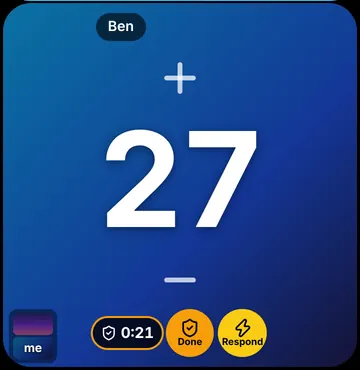
- A declare-blockers window: Attack starts a short countdown for the defenders, and the attacker's clock waits.
- Extra or less time for any seat (handicap), a match timer with extra turns, and low-time warnings.
- What happens at 0:00 is up to you: lose, a grace period, a flag, or more time.
Life and counters
Commander damage from every opponent, at a glance
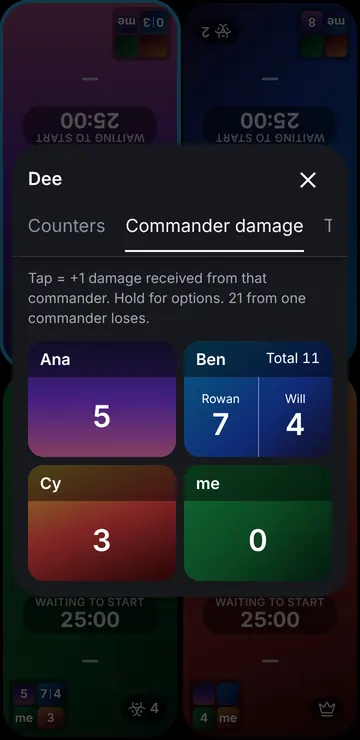
Each tile's mini-grid shows the commander damage you've taken from every opponent, with partners counted separately. Tap it to open your menu and adjust any of it.
- Commander damage per opponent and per partner, plus commander tax.
- Poison, energy, experience, storm and more, each where the game needs it.
- Monarch and initiative: only one player holds each, and handing it over is one tap.
- Day and night, the City's Blessing and other game-wide markers.
- Quick tools always close at hand: dice, a coin flip, and picking a random player.
Profiles, decks and stats
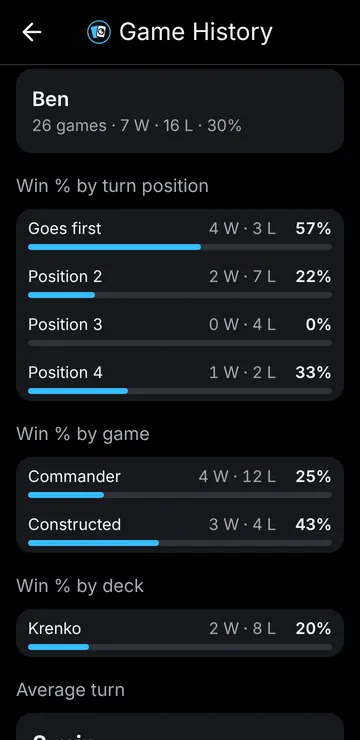
Stats for every player and deck
Every finished game is saved, so you can see who wins, with which deck, from which seat, and who beats whom head to head.
- Win rates per player for everyone; with Pro, full player and deck pages: by turn position, game type and deck, plus head-to-head records and insights.
- Player profiles with their decks, ready to drop into a seat.
- Pick commanders by name with suggestions from Scryfall, and give a profile or deck its own card-art background.
- Each game's history: who won, how long it took, life over time.
Presets
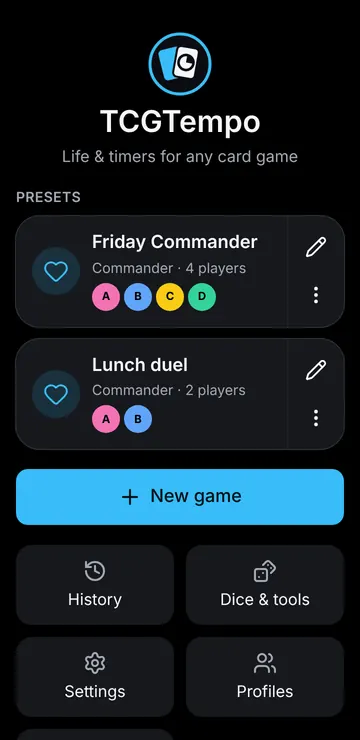
Your pod in one tap
Save your group's exact setup once: the game type, house rules, clock settings, who sits where and which decks they play. Next game night, tap the preset and you're playing.
Game types
Built for the games you play
17 ready-made game types across 10 card games, each with the right starting life, counters and rules for losing, so you can pick one and start.
- Magic: The Gathering: Commander, Brawl, Oathbreaker, Constructed, Limited
- Pokémon TCG
- Yu-Gi-Oh! TCG, Speed Duel and Rush Duel
- Disney Lorcana
- Flesh and Blood
- Final Fantasy TCG
- Star Wars: Unlimited
- One Piece Card Game
- Digimon Card Game
- Sorcery: Contested Realm
- A simple life counter for anything else
Playing something else, or a house variant? Build your own game type with your own counters, starting values and win conditions. Two-Headed Giant and Archenemy are on the way.
Offline and sync
Works offline. Syncs when you want it to.
- Everything runs on your device, so a bad signal at the game store never stops a game.
- Install it to your home screen and it opens full screen, like any other app.
- Sign in with Google (optional) to sync your settings, profiles, decks, presets and game types across your devices.
Pricing
Free, with an optional Pro
Everything you need to play is free, and every clock is free. Pro adds room to grow and long-term stats for $1.99 a month or $19.99 a year, and supports development. There are no ads on either plan.
| Feature | Free | Pro |
|---|---|---|
| All game types, life, counters and tools | Included | Included |
| Every clock mode, Respond, blockers window, match timer | Included | Included |
| Players in a game | 1 to 6 | Up to 8 |
| Custom game types | 1 | Unlimited, with share links |
| Presets | 1 | Unlimited |
| Player profiles and decks | 4 profiles, 1 deck each | Unlimited |
| Past games you can view | The latest 5 (all are kept) | All, with filters and export |
| Stats | Win rates per player, summary | Plus player pages, head-to-head, decks, full insights |
| Sync with Google sign-in | Settings, profiles, decks, presets, game types | Plus your game history |
| Your own images, synced | 5 | 200 |
Payments are handled by Stripe. Cancel any time from the app's Pro page. Card art from Scryfall is always free.
Install
How to install
TCGTempo is a web app: install it from your browser in a few seconds. No app store needed.
iPhone and iPad
- Open the app in Safari.
- Tap the Share button (the square with an arrow pointing up).
- Scroll down and tap Add to Home Screen.
- Tap Add. TCGTempo is now on your home screen.
On iPhone and iPad this only works in Safari. If you use another browser, open the link in Safari first.
Android
- Open the app in Chrome.
- Tap the menu (⋮) in the top right corner.
- Tap Install app (or Add to Home screen).
- Confirm with Install. TCGTempo opens from your app drawer.
In Chrome, the app's start screen also has an Install entry that does this in one tap. On a computer, use the install icon in the address bar.